


Before You Buy a Printer: Define Your Needs First


Before you buy any printer, ask yourself a simple question: what will you print, how much, and who will use it? There is no single best printer for every home, office and company. The right choice depends on your print volume, whether you need color, whether you need copying and a scanner, the cost of consumables, and how your devices connect.
This guide walks you step by step from your needs to the printer’s specifications. You will find a practical comparison of laser and inkjet printers, and a checklist to compare models before you pay. If you are ready to browse the options, start with the printers and scanners category at Toner Top, then check each model’s specifications and its price at the time of purchase.
An introductory comparison of printer types, without favoring any brand.
1. Decide who will use the printer and what they will print
Before you compare speed, resolution or price, define the users and the daily tasks. “Home printer” or “business printer” alone is not enough to choose a machine, because the needs of a home that prints homework can differ from an office that prints invoices and documents every day.
Write a short list of what you will print in a normal month.
For example: text documents, school homework, invoices, spreadsheets, photos, color presentations, or copies of paper documents. Then note who will use the printer, and whether it will be one person or several.
These details stop you buying a machine with functions you do not need, or choosing a basic printer and then finding out you need a scanner or a network connection.
They also let you compare models on the tasks you will really use, not on a long list of specifications.
For home use

For home use, think about how often you print and what kind of paper before you pick a printer type. Will you print homework or a document once a week? Are there color photos or learning materials? Do family members need to print from a phone or laptop? Do you need to copy or scan paper?
If you mainly print occasional text documents, focus on easy setup and the availability of suitable consumables. If you print color or photos regularly, compare the quality and cost of color printing between models, and do not rely on the price of the machine alone.
If you print rarely or in bursts, check the usage and care requirements in the manufacturer’s guide. Consumables and design differ from model to model, so it is better to follow the instructions for your specific model than to assume one rule applies to every printer.
For a small office
In a small office, ask how many people will use the machine, how they will share it, and how many pages you print on a normal day and on busy days. Also consider whether you need copying and scanning to send documents, two-sided printing to save paper, or a network connection instead of connecting the machine to a single computer.
If more than one person will print, check the connection options the model really supports, such as USB, Wi-Fi or Ethernet, and make sure they work with your office devices. If your team handles multi-page documents, check whether the machine has an automatic document feeder and whether it suits the way you work.
Do not choose the fastest machine available just because speed looks like an important feature. Compare the stated speed with your print volume and number of users, and read the manufacturer’s specifications, because the measuring method, settings and document type can affect the result.
For a company
In a company, start by listing the departments or employees who will use the printer, the types of documents, the usual page count, and any periods of heavy printing. Then decide whether you need printing only, or copying and scanning too, and whether staff need to connect from several devices.
If documents are internal or sensitive, add access management and secure printing to your requirements, then check that the model page lists the right features. Some business solutions offer user management or security features, but availability varies by device, software and setup, so do not assume every office printer has them.
If you are searching for the “best printer for a company”, turn the question into requirements you can compare: usage volume, number of users, machine functions, connection options, cost of consumables and their availability. Once the requirements are clear, compare the available models instead of relying on a general description like “professional” or “for business”.
Summary of section 1: Write down the tasks and users before you look for a model. That list decides which specifications are essential and which are extras.
Home and office needs differ. Start by defining tasks and users before you compare machines.
2. Estimate your print volume before choosing a printer type
Print volume is not just a rough number. It is a starting point for comparing the type of machine, its running cost and its speed. But instead of guessing, use a simple log or a realistic estimate based on your normal use.
Start by reviewing what you printed over a normal week or month. If you have no record, estimate each category: work or study papers, administrative documents, invoices, copies, and photos or color materials. Multiply the weekly average by the number of weeks in the month as a first estimate, then check the figure after a period of real use.
Do not confuse “usual volume” with “maximum possible volume”. If you have seasonal peaks, account-closing periods or exams when printing rises, record them separately. The average describes steady use, while the peak tells you whether speed or paper capacity is an important factor.
A practical estimate for home use
At home, record how often you print and roughly how many pages that produces. Separate a single-sided page, a multi-page document, and an extra copy for a family member. Also ask yourself whether you need color for most print jobs or only on some occasions.
If you print at long intervals, do not assume the monthly page count alone is enough. Check the printer’s guide on operation and maintenance, and consider the availability and cost of consumables. Acceptable use and care differ by printing technology and model.
A practical estimate for an office or company
In an office, collect estimates from users or departments instead of relying on one person’s impression. Work out the usual documents per user, whether many copies of the same file are printed, and whether some internal documents are black and white while others need color.
Then sort the usage into three numbers: the average pages on a working day, the monthly average, and the peak period. These figures are operating estimates from your own activity data, not a printer specification. Compare them with the usage limits the manufacturer states for the model before you buy, and do not rely on the store description alone if it does not explain how the figure is measured.
If you have more than one printer or work location, decide whether each team needs a machine close by or a shared machine is enough. This decision affects connectivity, placement and how the load is spread, and it can matter more than a faster single machine.
Why does print volume change the buying decision?
Because volume affects how much speed and paper capacity matter, and the long-term cost of consumables. The suitability of a technology also changes with the mix of use: a lot of text documents is different from printing photos or color materials all the time.
There is no single monthly limit above which laser or inkjet is the right choice for everyone. Check the model’s specifications, the cost of the ink or toner that fits it, the availability of consumables, and the type of pages you print. If cost-per-page data is not available, treat it as something to verify before you decide, rather than basing the choice on an unverified number.
Summary of section 2: Work out your average use and peak periods, then compare them with the model’s specifications and the cost of its consumables. Do not rely on a speed figure or usage limit without knowing how it was measured.
3. Do you need color, or is black and white enough?
Before choosing a color or monochrome printer, review the documents you actually print in a normal month. If most are text, invoices and forms that do not rely on color, you may not need to pay extra for a feature you rarely use.
If color is a regular part of your work, such as learning materials, presentations or photos, a color printer makes more sense. What matters is how often you use it, so do not treat color as essential just because it is available.
When is black and white enough?
A monochrome printer may suit you if your documents rely on text and data and do not need color to stand out. Before choosing, make sure this covers your important documents, such as tables or forms that may use color to explain information.
Also check the cost and availability of consumables for the model. Do not assume a black-and-white printer will always be the cheapest: compare the real prices of the machine and its consumables, and check the advertised price at the time of purchase.
When do you need color printing?
Consider color printing if you print photos, learning materials, presentations, or documents that need a clear distinction between elements. Decide whether you need color mainly for charts and graphics, or good results for photos, because the requirements are not the same.
When comparing color printers, do not rely on the word “color” alone. Check the paper types the model supports, the consumables it needs, its print quality options, and any special requirements the manufacturer lists.
If photos matter, test the model against your needs
Photo quality is not decided by the resolution figure alone. Paper type, print settings and the consumables used are all factors to check in the model’s guide.
If photo printing is a main use, look for specifications or reviews about photo printing specifically, and compare the cost with the number of photos you expect. If you print only a few photos now and then, ask whether an outside printing service is a better fit than buying a machine for rare use.
Quick rule: If most of your use is text documents, start by comparing black-and-white options. If you need color regularly, compare the cost of color printing and the expected results before choosing a model.
4. Print only, or a multifunction printer?
The choice depends on the tasks you want the machine to do. A single-function printer may be enough if you only need to print, or if you have another device for copying and scanning.
A multifunction printer usually combines printing, copying and scanning, and may include other functions depending on the model. Before paying for a multifunction machine, estimate how often you will use each function, and make sure it works the way you need.
When is print-only enough?
Choose a print-only device if your main job is producing documents and you do not need to digitize paper or make copies. It can also suit you if you already have a separate copier or scanner that you use when needed.
Before buying, check the connection options, paper sizes, input capacity and consumables for the model. Fewer functions do not automatically mean a better deal in every case, so compare its price and specifications with the alternatives.
When do you need copying and scanning?
If you receive paper documents and need to send them electronically or keep a digital copy, a scanner function can be useful. Copying helps when you need paper copies of recurring documents and do not want a separate machine.
Decide what kinds of paper you will handle. For single pages or book pages, check the scanning method available and the glass area, if any. For stacks of paper, check whether there is an automatic document feeder and whether the model supports the size and number of sheets you need.
Check the extra features before making them a requirement
You may need two-sided printing if you print multi-page documents, but make sure the model supports automatic two-sided printing. Some machines may require you to flip the paper by hand, so a general mention of two-sided printing is not enough.
Also ask whether you need fax, a network connection or color copying. Compare the functions you will use all the time with those that only look attractive on a product page.
Before you decide, write down three answers: Will you only print? Will you copy or scan paper? Do you need an automatic feeder or two-sided printing? These answers make the comparison between multifunction models more accurate.
5. Work out the running cost and the cost per printed page
The price of the machine is only one part of the cost. Before buying, look up the prices of consumables that fit the model, the stated page yield of each consumable, and how available it is in the market. Then use the comparison as an estimate, not a promise of a fixed number of pages.
You can estimate the consumable cost per page with this formula:
Consumable price ÷ stated page yield = approximate consumable cost per page.
This result does not include the price of the printer or paper, or differences in page coverage and print settings. The stated yield also does not guarantee the same result for every user, so compare models on the same use and make sure the consumables are suitable.
For current product prices, see the printers and scanners page at Toner Top and the product pages listed there. Do not add figures to your plan until you have checked the current price and the manufacturer’s data for the consumable.
6. Choose the right connection method
USB suits a direct connection to a single device. Wi-Fi may allow printing from more than one device, depending on printer support and network setup. In an office, Ethernet can be useful when you need to connect the machine to a local network.
Before buying, check the supported operating systems and devices, and how printing from a phone works if that matters to you. Having wireless does not automatically mean every app or phone is compatible, so check the model page and the manufacturer’s instructions.
7. Other specifications worth checking
Compare print speed if the time to finish documents matters, but be aware of the stated measuring conditions. Check the supported paper sizes, the dimensions of the machine and the space available for it. Check automatic two-sided printing if you print long documents and want to use less paper.
Also check the availability of consumables, how easy the setup is, and the maintenance method in the user guide. Technical figures such as speed, resolution, monthly limits and compatibility must be verified for a specific model, not generalized from the name of the technology.
8. Comparison table: laser vs inkjet printers
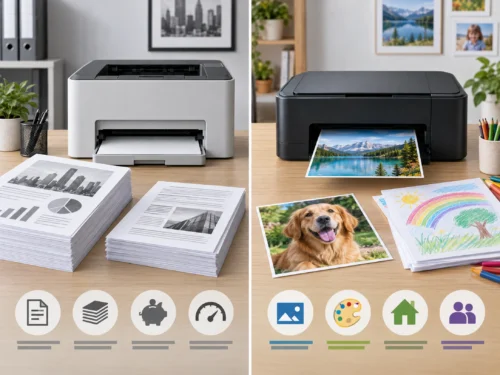
The table below is a general comparison between two different printer technologies.
“Inkjet” covers models with different ink systems, so a single description does not apply to every printer in the category.
As an example, we are talking about an HP inkjet printer.
Check the product model and its consumables before you decide.
| Comparison | Laser printer | Inkjet printer | What to check before buying |
|---|---|---|---|
| Typical use | May suit text documents, especially in an office | May suit uses that need a variety of documents and colors, depending on the model | The paper you really print, not just the technology name |
| Black-and-white printing | Monochrome models are available | Black-and-white or color models are available, depending on the machine | Do you need color or not? |
| Color printing and photos | Color laser models are available, but photo ability and cost vary by model | Color models are available and may suit some photo uses; check the quality of the specific model | The type of color you need and the cost of its consumables |
| Purchase price | Varies widely by model and functions | Varies by model, ink system and functions | The current price and what is in the box |
| Cost of consumables and running | Depends on the type of toner cartridge, its price, the stated yield and how you use it | Depends on the cartridge or ink tank system, the price of consumables, the yield and use | Estimate the cost for the right consumable; do not rely on a general cost for the whole category |
| Copy and scan functions | Only in multifunction models | Only in multifunction models | Do you need print only, or copy and scan too? |
| Connection and office features | Varies by model | Varies by model | Check Wi-Fi, Ethernet, USB and two-sided printing on the model page |
The image shows common examples of use only. The final decision depends on the printer model and your real needs.
Summary: Do not choose between laser and inkjet by name alone. Start with the type of documents, print volume and color, then compare the price of the machine, the cost of consumables and the real features of the available models.
9. Choose a printer for your needs
If you are looking for a home printer: Define how often you print and whether you need color, copying and scanning, then compare the cost of consumables and how easy it is to connect.
If you are looking for the best printer for an office: Count the users and the print volume, and decide on the functions you need and the connection method. Compare the model’s speed and specifications with your expected workload.
If you are looking for the best printer for a company: Start with the requirements of each department, the document flow and the number of users. Check from the official model pages the usage limits, connectivity and any management or security features you need.
There is no “best printer” for everyone. The best one is the machine that matches your list of needs, whose consumables you can source, and whose cost you can verify before you buy.
10. Checklist before buying any printer
- Who will use the printer, and how many people need access?
- What types of paper will you mostly print?
- How many pages do you print a month, and do you have peak periods?
- Do you need color, or is black and white enough?
- Do you need copying, scanning or two-sided printing?
- What do the right consumables for the model cost, and are they available?
- Do you need USB, Wi-Fi, Ethernet or printing from a phone?
- Do the machine’s dimensions and supported paper sizes suit your space?
- Have you checked the specifications and compatibility with the manufacturer?
Frequently asked questions before buying a printer
What is the best type of printer for work?
There is no single type that suits all work. Define your print volume, document types, and your need for color, copying and scanning, then compare models and their consumables.
How do I choose a home printer?
Start with how often you print and the type of paper. Then decide whether you need color, or a scanner and copier, and compare the cost of consumables and connection options.
What is the difference between office printers and company printers?
These are general descriptions of use, not fixed specifications. Compare the number of users, print volume, functions, connectivity and the usage limits the manufacturer states for each model.
How do I calculate the cost of printing a page?
Divide the price of the consumable by its stated page yield to get a first estimate. The result does not include every cost, and it may vary with the type of document, settings and use.
Should I buy a printer with a scanner?
Buy a multifunction machine if you really need copying or scanning. Check the scanning method and the document feeder in the model’s specifications if you handle a lot of paper.
Conclusion: define your needs before choosing a model
Before you buy any printer, start with four points: who will use it, what you will print, the expected volume, and whether you need color or copying and scanning. Then choose the right connection method, and compare the cost of the machine and its consumables with the official specifications of the models that suit your needs.
If you are choosing a printer for home, focus on how often you print and the functions you actually need. For an office or company, add the number of users, the busy periods and the connection options to your comparison.
Do not rely on the phrase “best printer” or on the purchase price alone. The best choice is the model that matches your use, with consumables whose compatibility and cost you have checked, and specifications you have verified before ordering.
You can browse the options in the printers and scanners category at Toner Top and compare the prices and specifications shown at the time of purchase. If you cannot decide between two models, go back to the checklist in this article and ask about consumable compatibility before you confirm the order.