
HP LaserJet Pro M141w vs Epson EcoTank L3250: Which Is Better for Your Office in Egypt?

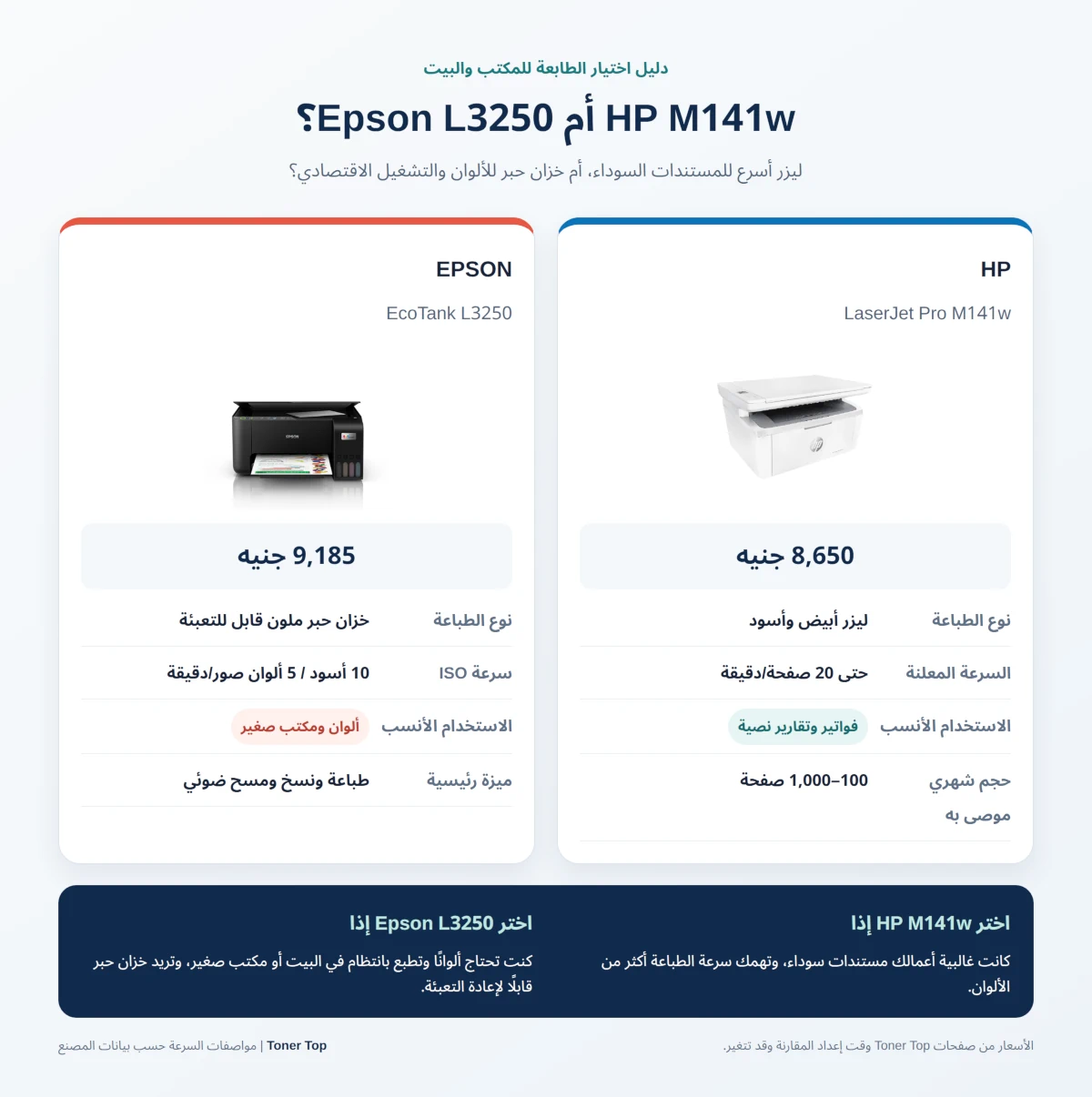
If your office prints black-and-white documents in volume, the HP LaserJet Pro M141w is usually the faster, more practical choice. If you need color and want lower ink costs over the long run, the Epson EcoTank L3250 is the better fit. Just note that it prints color documents more slowly and is designed mainly for home and light office use. [1] [2] [3]
At Toner Top prices when this comparison was written, the HP costs about 8,650 EGP and the Epson about 9,185 EGP. The gap is only 535 EGP, so do not let the purchase price alone decide. What matters more is the type of documents you print, your monthly volume, and whether you really need color. [4] [5]
| Printer | Best for | Price at Toner Top | Key difference |
|---|---|---|---|
| HP LaserJet Pro M141w | Black-and-white office documents | 8,650 EGP | Laser printing, up to 20 pages per minute |
| Epson EcoTank L3250 | Home, small office and color printing | 9,185 EGP | Refillable ink tanks and color printing |
What is the difference between a laser printer and an ink tank printer?
The HP M141w uses dry toner powder and prints in black and white only. This type suits contracts, invoices, reports and forms that need clear text and good speed. A short pause in printing also does not mean toner drying out inside a print head.
The Epson L3250 uses refillable color ink tanks and combines printing, copying and scanning. It prints color documents and photos at a low ink cost per page with regular use. It is not a direct replacement for a fast laser printer if most of your work is dense black documents. [2] [3]
Why choose the HP M141w or the Epson L3250?

This is not a choice between two similar machines. It is a choice between a monochrome laser printer and a color ink tank printer. HP states speeds of up to 20 pages per minute and recommends a monthly print volume of 100 to 1,000 pages. That suits a small office with a lot of text to print, but it does not make it a high-volume production machine. [1]
The Epson L3250 adds color and low ink costs, and Epson says it is designed for home use with wireless connectivity. Epson’s official specifications list ISO speeds of up to 10 images per minute in black and 5 images per minute in color. The faster draft speed is not the usual basis for comparing printers. [2] [3]
HP LaserJet Pro M141w: best for black-and-white office documents

Price: 8,650 EGP [4]
The M141w combines printing, copying and scanning in a compact laser machine, with Wi-Fi and USB. It prints up to 20 pages per minute at a maximum resolution of 600 x 600 dpi. It prints in black and white only and has no automatic two-sided printing. [1] [4]
Strengths:
- Faster for black-and-white office printing, based on the published speeds of both models.
- You do not pay for color your office will not use.
- Toner powder is well suited to invoices, contracts and text forms.
- Compact size, with printing, copying, scanning and wireless connectivity.
Trade-offs:
- It does not print color documents or photos.
- Running costs depend on the price and availability of the W1500A cartridge when you buy.
- The original HP 150A cartridge (W1500A) is rated at about 975 pages under the manufacturer’s standard. Actual yield varies with coverage and printing habits. [6]
- There is no automatic two-sided printing, and the recommended monthly volume is only 100 to 1,000 pages. [1]
How does it differ from the Epson L3250?
1. The HP is faster for black documents based on published speeds: up to 20 pages per minute, against 10 images per minute (ISO) in black for the Epson. [1] [2]
2. The HP is monochrome; the Epson prints in color.
3. The HP uses a toner cartridge; the Epson uses ink tanks. Epson states a yield of up to 4,500 pages in black and 7,500 pages in color for the replacement ink bottles, with actual results varying by use. [2]
- Best for: a small office or business that regularly prints black text documents and does not need color.
Epson EcoTank L3250: best for color and low ink costs
Price: 9,185 EGP [5]
The L3250 prints, copies and scans in color, with Wi-Fi and USB. Its maximum resolution is 5760 x 1440 dpi, and Epson lists ISO speeds of up to 10 images per minute in black and 5 images per minute in color. According to the brochure, it also supports borderless printing up to 4 x 6 inches. [2]
Strengths:
- It prints in color, so it suits presentations, tables, teaching materials and photos.
- Ink tanks lower the cost per page for frequent printing compared with a traditional cartridge system.
- Epson states a yield of up to 4,500 pages in black and 7,500 pages in color for the replacement ink bottles, based on the company’s test. [2]
- It prints, copies and scans, with Wi-Fi, Wi-Fi Direct and the Epson Smart Panel app. [2]
Trade-offs:
- Slower than the HP for black documents based on the published ISO speeds, and slower in color than in black.
- It is not a laser printer, so it is not the first choice if speed and dense text documents are the top priority.
- Actual ink yield varies with content, coverage and how often the print head is cleaned, and the printer uses some ink for setup and maintenance. [2]
- Epson designed this model for home use, and the Toner Top page describes it as suitable for homes and small offices. A company with heavy print volume should check it can handle the daily load before buying. [2] [5]
How does it differ from the HP M141w?
1. The Epson prints in color; the HP prints in black and white only.
2. The Epson has ink tanks with a high page yield according to the company’s tests, while the HP uses a toner cartridge rated at about 975 pages. Do not treat the two yields alone as equal costs. You also need local consumable prices and the type of pages you print. [2] [6]
3. The Epson is better for people who need color and wireless printing from several devices, while the HP is better for fast black text.
- Best for: a small office or home that needs color, prints regularly and wants a lower ink cost per page.
The verdict: which should you buy?
Buy the HP M141w if most of your work is black-and-white invoices, contracts or reports. It is faster for this kind of printing, and its price at Toner Top was 535 EGP lower when this article was written. You can view the HP LaserJet MFP M141w and order it from Toner Top.
Buy the Epson L3250 if you genuinely need color printing, print teaching materials, presentations or photos, and want ink tanks with a high yield. It costs a little more, but running costs over the long term may be better if you print in color regularly. See the Epson EcoTank L3250 page at Toner Top for the current price and availability.
If your office prints thousands of pages a month, or needs automatic two-sided printing or network sharing between several staff, also compare higher-end models built for business use. These two machines are multifunction printers, but neither offers automatic two-sided printing.
Frequently asked questions
Which is better for an office, the HP M141w or the Epson L3250?
The HP M141w is better if you mainly print black documents and speed matters. The Epson L3250 suits a small office that needs color and a lower ink cost per page with regular printing.
Is the Epson L3250 cheaper to run than the HP M141w?
Epson ink tanks are often cheaper per page when you print a large number of pages, but the exact cost in Egypt depends on the price of ink bottles and of original or compatible toner. Page yield alone is not enough to decide, so compare the price of the consumable you will actually buy.
Does the HP M141w print in color?
No. The HP M141w is a monochrome laser printer and prints in black only. If your company needs color documents or photos, the Epson L3250 is the choice between these two models.
How fast do the HP M141w and Epson L3250 print?
HP states speeds of up to 20 pages per minute for black printing. Epson lists ISO speeds of up to 10 images per minute in black and 5 images per minute in color. The HP leads for black documents, while the Epson adds the color option. [1] [2]
Is the Epson L3250 suitable for companies?
It suits a small office or work that needs color at a moderate print volume. For very heavy printing, check the recommended usage volume and consider a business printer built for larger loads.