


How Does a Laser Printer Print Without Liquid Ink?

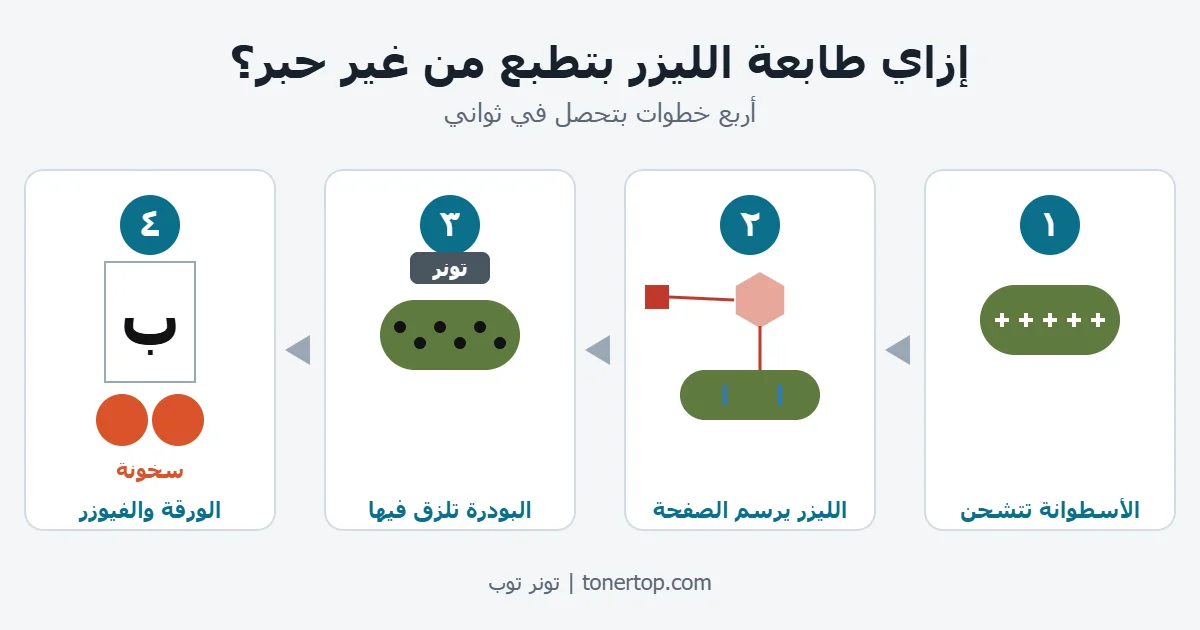
A laser printer has no liquid ink at all.
The letters on the page are made of a very fine powder called toner, and static electricity puts it exactly where it belongs.
In this guide we explain the idea in simple steps, then show how it connects to the print problems you see and how it helps you buy the right toner.
The core idea: static electricity
Think of a balloon you rub on your clothes or hair. Afterwards it sticks to a wall or pulls up tiny scraps of paper.
Static electricity makes charged objects attract light things.
A laser printer uses exactly the same idea, only with very high precision.
Instead of a balloon it has a smooth drum, and instead of paper scraps it has toner powder.
Step 1: The drum and laser draw the page
When you press “Print”, the printer gives the surface of the drum an even electric charge.
A laser beam then sweeps across the drum, line after line.
The beam does not print anything in the usual sense. It changes the charge on the spots it touches.
The drum now holds an invisible picture of the page: letters and images made of spots with a different charge from the rest of the surface.
The beam is steered by a small mirror that spins extremely fast, up to thousands of turns per minute. That is why a page prints in seconds.
Step 2: Toner sticks only to the image
As the drum turns, it passes the toner reservoir.
Toner is a charged powder, so it is pulled toward the spots the laser changed, and it sticks there.
The rest of the drum is clean, so no powder sticks to it.
The page now exists on the drum as powder, but it has not reached the paper yet.
Step 3: The paper takes the toner, and heat fixes it
The paper passes under the drum and picks up a stronger charge, so it pulls the powder off the drum and onto the sheet.
At this moment the letters on the paper are still loose powder. If you touched them, they would smudge.
That is why the paper then passes between two hot rollers called the fuser.
The heat melts the powder and bonds it firmly to the paper fibers.
This is also why a page that has just left the printer feels warm.
The printer then discharges the drum, cleans off any leftover powder and starts on the next page.
Color printers: the same story, four times
A color printer repeats the process with four colors: black, cyan (light blue), magenta (pink) and yellow.
Each color has its own toner cartridge, and each one draws its part of the page.
The colors are laid on the same sheet on top of each other, and mixing them creates the other colors, such as green from yellow and blue.
This is why color laser printers need four toner cartridges, not one.

The secret yellow dots
Some color laser printers print tiny yellow dots on every page without you noticing.
The dots can form a code that carries the printer’s serial number and the print date. You can only see them under magnification or blue light.
This is documented in research on printers by the EFF, but it applies to certain models only. Not every printer does it.
The EFF also says newer printers may use other methods that are not necessarily yellow dots. You can see the EFF list of printers that do and do not print tracking dots.
What this means for the toner you buy
Understanding these steps makes it easier to find the cause when printing goes wrong.
| What you see | Most likely cause | Related part |
|---|---|---|
| Faded prints | The toner is running low | Toner cartridge |
| Lines or spots repeating in the same places | A problem with the drum | Drum unit |
| Letters smudge under your finger | Not enough heat to fix the powder | Fuser |
| Paper jams | Damp paper or worn rollers | Paper path |
This table is only a first guide. If the problem continues after you change the toner, ask a service technician.
Because toner is a charged powder made for a specific printer, the cartridge number must match your printer model.
If you are unsure which type to buy, read the difference between original and compatible toner.
Or browse the categories directly:
If you are not sure which number fits your printer, send us a photo of your old cartridge on WhatsApp and we will reply with the number and the price.
Delivery to every governorate takes 1 to 2 business days, and shipping is free for orders from 1000 EGP.
Frequently asked questions
Does a laser printer use ink?
No, it uses a powder called toner.
Liquid ink is used by inkjet printers, which is an important difference when you buy replacement cartridges.
Why does a page come out of a laser printer warm?
Because it passes between two hot rollers (the fuser) that melt the powder and bond it to the paper.
Can toner rub off the page after printing?
Not normally, because the heat bonds it into the paper fibers.
If it rubs off easily, there is probably a problem with the fuser.